
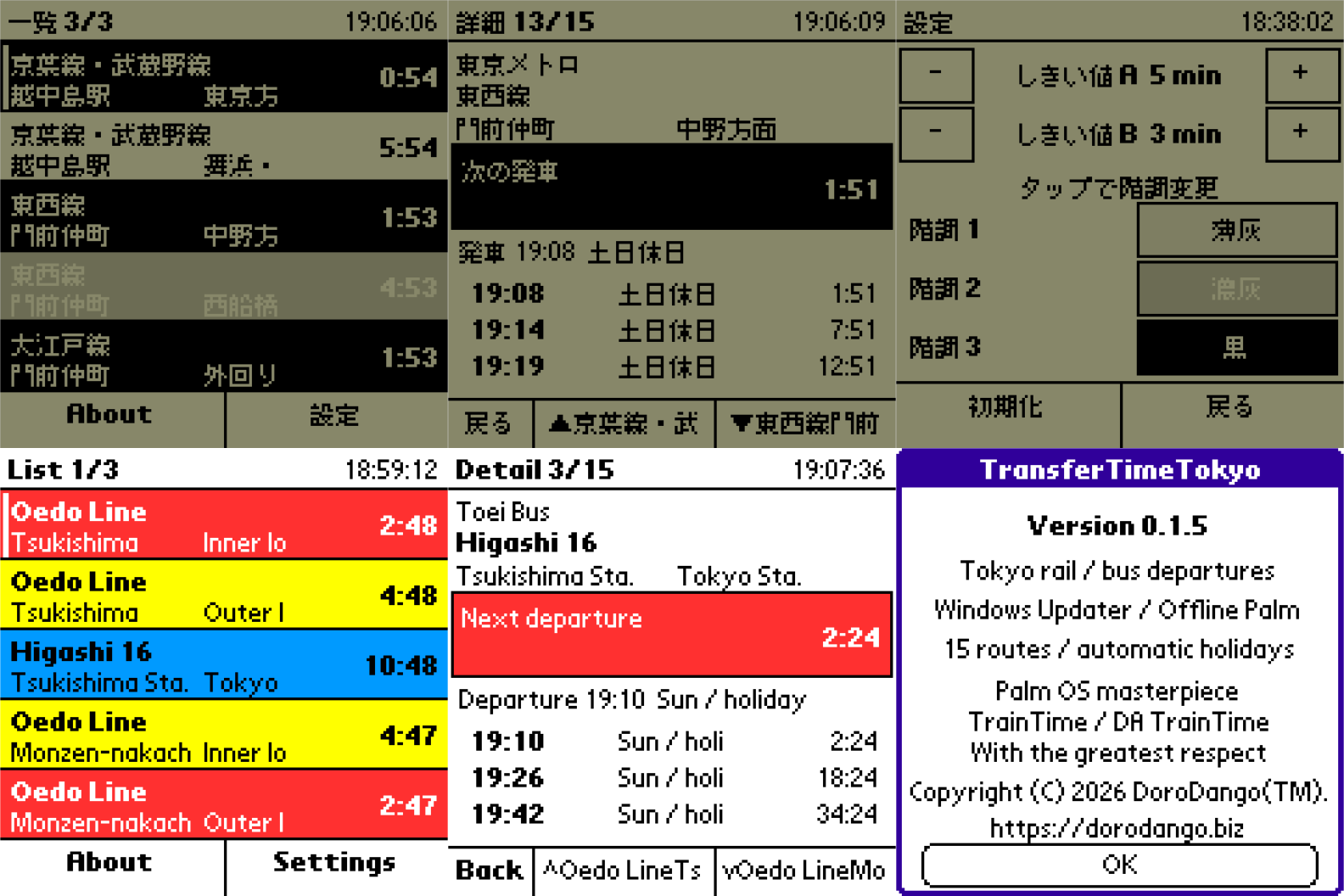
TransferTimeTokyo (東京乗換隊) is a compact departure countdown for classic Palm OS handhelds. It keeps the selected timetables on the Palm, so checking the next train or bus is immediate and does not require a network connection on the handheld.
Up to fifteen departure boards can be registered. They are arranged as three cyclic list pages with five boards per page. Each board identifies one operator, rail line or bus route, boarding station or stop, and direction. The same board may be registered in more than one position. Tapping a row opens its timetable detail, and previous and next controls move continuously through all registrations across page boundaries.
What's New in 0.1.5
- Added native four-shade greyscale rendering on Palm OS 3.1 handhelds with 2bpp displays, including Visor Deluxe
- Reserved stippled black-and-white shading for handhelds whose display is truly limited to 1bpp
- Added depth-specific 2bpp and 4bpp launcher artwork and release-time Palm bitmap validation
Features include:
- Up to fifteen Tokyo-area rail or bus departure boards
- Three cyclic list pages with five boards per page
- Duplicate board placement in separate list positions
- Automatic weekday, Saturday, Sunday and Japanese public-holiday selection
- Next-departure countdowns updated from the Palm's own clock
- Three urgency bands with configurable thresholds and colours
- Four selectable shades—white, light grey, dark grey and black—on monochrome handhelds
- Independent About and Settings screens
- Touchscreen, Page Up/Page Down and directional-key navigation
- Japanese and English Palm builds
- No registration code or external Palm libraries required
The default colour scheme uses blue for departures at least five minutes away, yellow from three to five minutes, and red for less than three minutes. Colour handhelds offer eight palette choices for each band. Monochrome handhelds offer the same four shade choices on Palm OS versions before and after 3.5; the application selects the best supported monochrome depth and restores the original display mode when it exits.
The Palm application itself stays offline. The optional, self-contained TransferTimeUpdater for 64-bit Windows retrieves or imports timetable and holiday data, validates a complete Palm database, and queues it for the selected Palm Desktop users. The next ordinary HotSync transfers that database to the Palm. Python is not required for the packaged updater.
The updater has two data-policy profiles. The personal profile is intended for a user's own non-public database and may use sources whose terms allow only personal use, including supported official timetable pages, ODPT datasets and user-supplied CSV files. Users remain responsible for checking the terms, copyright conditions and current availability of every source they select. The public profile accepts only registrations marked as redistributable and reports an error instead of silently including personal-only data. The same application and updater are used for both profiles; the policy controls database generation, not the Palm executable.
No prebuilt timetable database, downloaded timetable, web cache, generated CSV, API token or credential is included in the PalmDB downloads. Each user's PC obtains or imports the data needed for that user's own Palm. Generated personal-use databases and cached source material must not be redistributed without the necessary rights.
TransferTimeTokyo is a departure-board viewer, not a journey planner. It does not calculate routes or transfers, decide whether a connection is possible, or provide live delay, disruption, train-position or bus-position information. Displayed departures come from the most recently generated offline database and may become outdated when an operator changes its timetable.
This project is an independent, unofficial modern tribute to the classic Palm applications TrainTime and DA TrainTime, created with the greatest respect for their work and influence. It is not authorized, endorsed or affiliated with their authors or related parties, and uses none of their original code or assets.
The Windows updater is unsigned, so Windows SmartScreen may ask for confirmation. Verify the download checksum before running it.
Compatibility
| Device: | All |
| OS: | 3.03.54.05.05.4 |
- Palm OS 3.1 or later
- 68K Palm OS application
- Standard 160×160 Palm OS display
- Monochrome and colour handhelds
- Japanese Palm OS or the English build on an English Palm OS system
- Optional updater: 64-bit Windows with Palm Desktop and HotSync Manager
Download
| Version | File | Size |
|---|---|---|
| 0.1.5 Japanese | TransferTimeTokyo_0.1.5_JP.prc | 24K |
| 0.1.5 English | TransferTimeTokyo_0.1.5_EN.prc | 24K |
| 0.1.5 Windows x64 | TransferTimeTokyo_0.1.5_Windows_x64.zip | 24M |
Install either the Japanese or English PRC, but not both, because they share the same Palm application identity. To load timetables, unpack the Windows x64 package, run TransferTimeUpdater.exe, register up to fifteen departure boards, select one or more Palm Desktop users, and perform a normal HotSync after a successful update. HotSync remains the final transfer step.
When upgrading from 0.1.3 or earlier, HotSync the 0.1.5 PRC before generating and transferring a database with six or more boards. Older PRCs accept at most five boards.








comments