
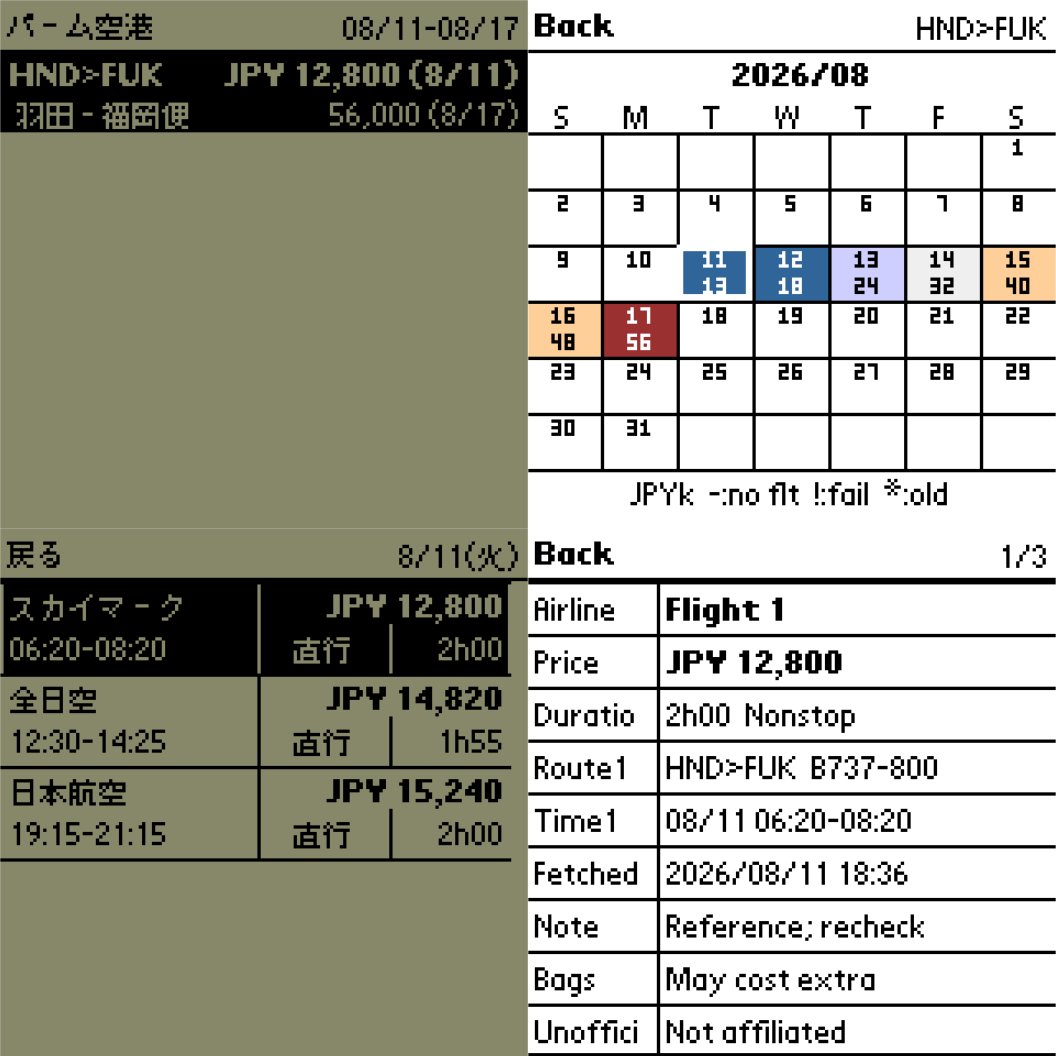
Palm Airport (パーム空港) is an offline airfare comparison app for classic Palm OS handhelds. Search conditions are configured on a Windows PC, and the resulting fare data is transferred through an ordinary HotSync. The Palm itself does not need a network connection.
Features include:
- Up to eight routes, each covering a rolling period of 1–90 days
- Airport search by Japanese or English name, city, or IATA code
- Route overview showing the lowest and highest fares with their dates
- Calendar comparison of each day's lowest fare
- Blue-to-red price display on color devices and four-level grayscale display on compatible monochrome devices
- Up to 12 flights per day with airline, price, times, stops, and duration
- Detailed itineraries with up to three flight segments
- Previous successful values retained and marked when an individual update fails
- Touchscreen, 5-way, and Page Up/Page Down navigation
- Separate Japanese and English Palm builds
- No registration code or external Palm libraries required
The optional self-contained Windows x64 updater requires no Python installation. It retrieves low-frequency fare snapshots, creates PalmAirportData.pdb, and queues it for selected Palm Desktop users. HotSync remains the final transfer step. Searches are currently limited to one-way economy fares for one adult in JPY.
Fare results are retrieved from Google Flights through the unofficial fast-flights 3.0.2 provider. Airport names use Public Domain data from OurAirports and CC0 data from Wikidata. Exact prices and availability must be confirmed online. Palm Airport is not affiliated with Google or any airline.
The Windows executable is unsigned, so SmartScreen may request confirmation.
Compatibility
| Device: | All |
| OS: | 3.03.54.05.05.4 |
- Palm OS 3.1 or later
- Standard 160×160 display
- 68K Palm OS application
- Monochrome, grayscale, and color handhelds
- Optional updater: 64-bit Windows with Palm Desktop and HotSync Manager
Download
| Version | File | Size |
|---|---|---|
| 0.2.0 Japanese | PalmAirport_0.2.0_JP.prc | 32K |
| 0.2.0 English | PalmAirport_0.2.0_EN.prc | 32K |
| 0.2.0 Windows x64 | PalmAirport_0.2.0_Windows_x64.zip | 20M |
Install either the Japanese or English PRC. To update fare data, extract the complete Windows package, run PalmAirportUpdater.exe, configure routes and Palm Desktop users, then perform a normal HotSync.










comments