
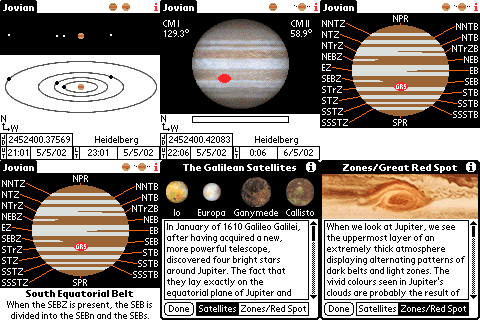
Introduction Observe Jupiter's four largest moons, also known as the Galilean Satellites, after Galileo Galilei, who first discovered and observed them in 1610, and Jupiter's Great Red Spot (GRS).
Jovian helps you to easily locate and identify the moons and lets you animate their orbits around our solar system's largest gas giant. Further screens show you the position of the GRS for any given time and date within the Palm's date range, and the different zones and belts in Jupiter's atmosphere with their names.
Jovian is available for all b/w, grey scale and colour Palm OS devices with Palm OS 2.0 through to Palm OS 5.
On the moons screen the top half of the screen shows you the positions of the moons around Jupiter as you would see them through binoculars or a telescope.
The lower half has an orbital view with a direction indicator to clarify whether a moon is in front or behind Jupiter (keep in mind that the North direction always indicates the half of the orbit which is behind Jupiter). Tapping the direction indicators switches the orientation to accommodate for viewing through different telescopes and binoculars.
Tapping on a moon displays its name at the top of the screen.
The GRS screen shows you the location of the GRS and the Central Meridian longitudes for System I and System II of Jupiter's atmosphere.
The bar below Jupiter shows the location when the GRS is on the far side.
This screen shows the different lighter zones and darker belts in Jupiter's atmosphere with their abbreviations. Tapping on an abbreviation gives the full name at the bottom of the display.
The info (i) button on either the orbital, zones or GRS screen calls up a window with informational texts and statistics of the moons and the GRS.
Registration
This app is pre-registered (thanks to Subvert from C4PDA.net)
Compatibility
| Device: | |
| OS: | 2.03.03.54.05.05.4 |
Download
| Version | File | Size |
|---|---|---|
| color | Jovian.prereg.prc | 172K |
| grayscale | JovianBW.prereg.prc | 88K |
| docs | docs.zip | 172K |








comments