
PilGom Kai (ぴるごむ改) is a compact Japanese RSS 2.0 and Atom reader for classic Palm OS handhelds. The Palm application stays completely offline: a Windows updater collects feed-supplied text, builds one validated Palm database, and queues it for the next HotSync.
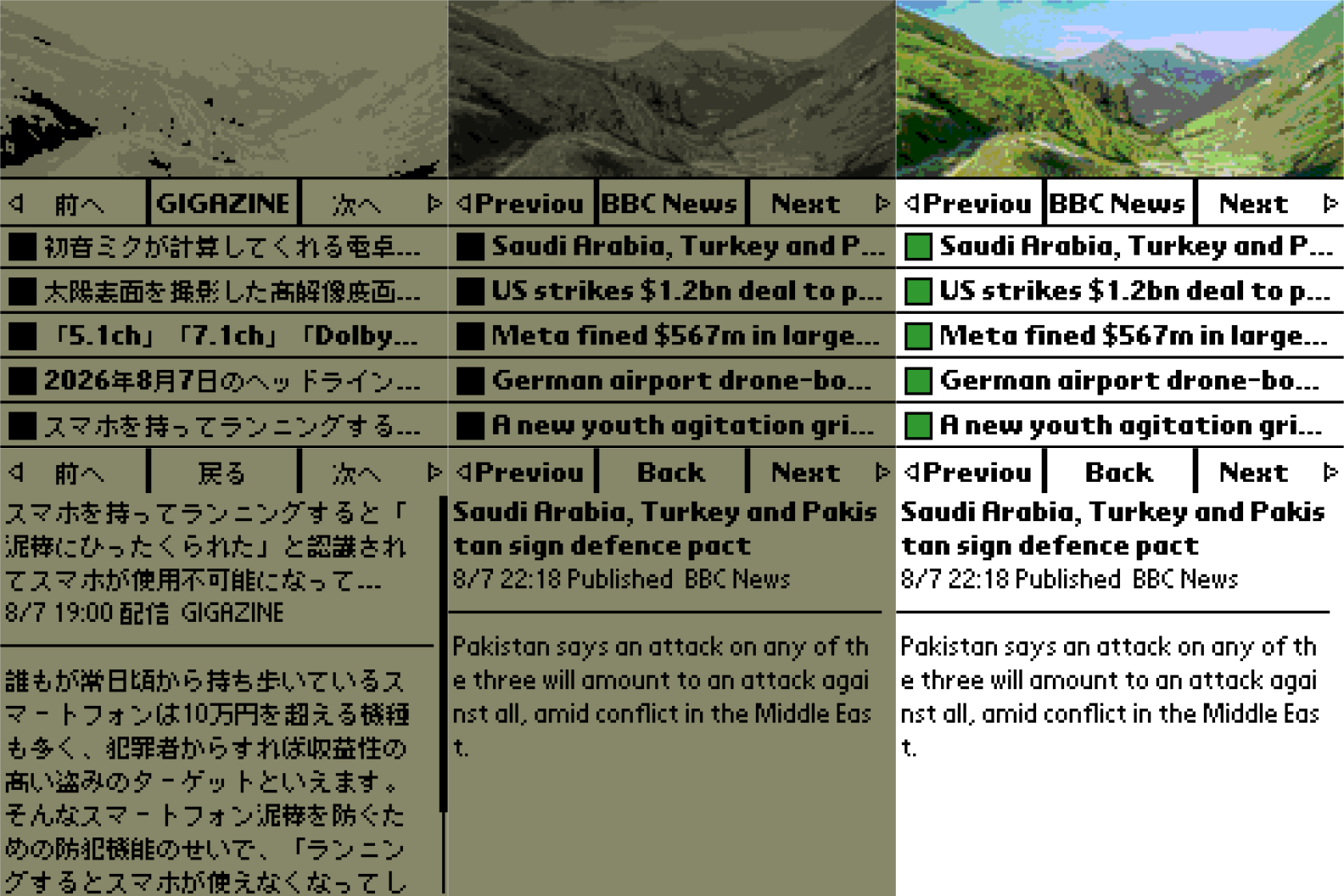
Up to 10 feeds can be registered, with up to 5 items from each feed (50 items total). The list view deliberately keeps everything important on one 160×160 screen: a fixed 160×64 picture, a Previous/feed-name/Next navigator, and five non-scrolling article rows. Feed names come from each RSS or Atom title rather than from hard-coded labels.
Features include:
- Up to 10 RSS 2.0 or Atom feeds and 50 feed-supplied items
- Circular feed switching with Page Up/Page Down, five-way Up/Down, or on-screen Previous/Next
- Five fixed article rows per feed with unread/read markers
- Vertically scrolling article text with fixed Previous/Back/Next controls
- Article navigation that crosses feed boundaries and wraps through the complete database
- Random Wikimedia Commons Featured Picture, packaged for 1-bit, 4-grey, 16-grey, and colour Palm screens
- A per-image credit, source, licence, and processing record saved beside every generated PDB
- Japanese Palm OS interface with an open-book launcher icon
- No registration code or external Palm libraries required
What's new in 0.2.1
- Added native 4-grey and 16-grey display modes for monochrome handhelds
- Expanded the photograph and open-book launcher icon to 1/2/4/8bpp bitmap families
- Restores the handheld's original screen depth when the application exits
- The 0.2.1 updater writes record format 4 with all four photograph depths
- The 0.2.1 PRC remains compatible with format 3 databases made by the 0.2.0 updater
The first of the ten editable URL fields contains the GIGAZINE RSS feed only as a first-run example; the other nine start blank, and every field may be replaced by the user. The updater stores only text supplied inside the feeds and never crawls linked article pages. Every configured feed must succeed before the previous PDB is replaced. The completed PDB is validated, limited to 512 KiB, and article bodies are never silently truncated merely to make them fit.
This is an independent, unofficial tribute to Koyama Tora's classic Mac utility “Visor ni Web ga PilGom?!” (VisorにWebがぴるごむ?!), which helped carry web information to Palm devices as DOC files. PilGom Kai was created in the Reiwa era with the greatest respect for that work. It is not authorized, endorsed, or affiliated with the original author or related parties, and uses none of the original code or assets.
View the archived page for the original utility.
The optional, self-contained PilGomKaiUpdater for 64-bit Windows manages the ten feed URLs, retrieves and validates fresh data, and queues PilGomKaiData.pdb for selected Palm Desktop users. It can update immediately or run automatically at Windows logon and every four hours. The next ordinary HotSync transfers the data to the Palm. Python is not required for the packaged updater.
The Windows updater is unsigned, so Windows SmartScreen may ask for confirmation.
Users are responsible for checking the terms and copyright conditions of every feed they enter. Generated databases and downloaded content must not be redistributed without the necessary rights.
Featured screenshot
Each column shows the feed list above its article view. From left to right: the final Japanese PRC on a Palm V in 4-grey mode; an internal English-language screenshot build of the same 0.2.1 source in a fixed 16-grey CloudPilotEmu session; and that screenshot build on a colour Palm m515. The downloadable PRC remains the Japanese edition.
Photo shown in the 0.2.1 screenshot: “Pointe de Nyon & Pointe d'Angolon (12)” by Krzysztof Golik, via Wikimedia Commons, licensed under CC BY-SA 4.0. It was centre-cropped, resized to 160×64, reduced to a 216-colour Palm palette, and rendered as matching 1-bit, 4-grey, and 16-grey variants. The published screenshot composite is distributed under CC BY-SA 4.0 in accordance with ShareAlike; this does not change the software's distribution terms.
Compatibility
| Device: | All |
| OS: | 3.03.54.05.05.4 |
- Palm OS 3.1 or later
- Standard 160×160 Palm OS display
- 68K Palm OS application
- 1-bit, 4-grey, 16-grey, and colour handhelds
- Japanese Palm OS or a compatible Japanese environment
- Optional updater: 64-bit Windows with Palm Desktop and HotSync Manager
Download
| Version | File | Size |
|---|---|---|
| 0.2.1 Japanese | PilGomKai_0.2.1_JP.prc | 16K |
| 0.2.1 Windows x64 | PilGomKai_0.2.1_Windows_x64.zip | 19M |
Install the PRC and HotSync it to the Palm. To load news, unpack the Windows x64 package, run PilGomKaiUpdater.exe, edit one or more feed URLs, select one or more Palm Desktop users, and choose Update now or enable automatic updates. HotSync remains the final transfer step. No downloaded news database is bundled with the release.










comments