
HOW TO PLAY BALLS!
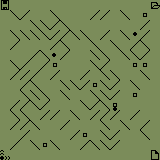
The object of the game is to change the direction of the walls in the playing field such that each ball will traverse the court and reach the other side. The court is made up of a number of balls (depending on the level of play) that are placed along the edge, and a playing area. The diagonal lines in the playing area are walls, and the squares are holes. The four icons in the corners are shortcuts for common menu items.
You may test the playing field at anytime with no penalty. Choose 'Test board' from the 'Board' menu, or click on the icon in the lower left corner of the court. The court is tested as all the balls move around playing area. When a ball hits a wall, it bounces 90 degrees to the side. When a ball hits a hole or the edge of the court, it stops. Balls are not affected by each other: they pass freely through each other.
Before you test the board, you will want to tap on some of the walls to change their diagonal orientation. The object of the game is to set the orientation of some of the walls such that all of the balls move to the other side of the court from where they started, without hitting any holes. When you tap on a wall, it will switch its orientation and become thick: this lets you know that you've changed this wall. If you tap twice quickly on a wall, it will switch from a thin diagonal line to a think line, and vice versa (this is useful if the orientation of a wall is correct, but you want to mark it as used).
Compatibility
| Device: | All |
| OS: | 3.03.54.05.05.4 |
Download
| Version | File | Size |
|---|---|---|
| 1.0 | BALLS.PRC | 28K |
| 1.0 | README.TXT | 4.0K |







comments